LUXR Update
Install LUXR, the drum machine firmware for the M-VAVE FM-1, over USB. Runs in Chrome or Edge on this computer; the files stay in the browser.
Support me and my projects – thank you so much!
♥ Donate with PayPal1 · Device
Connect the FM-1 directly to the computer with a USB data cable; close other MIDI programs.
- Firmware
- –
- Product ID
- –
- MIDI port
- –
- Storage
- –
2 · Install the firmware luxr.fwsc
- The firmware of this build is already loaded; or choose your own
luxr.fwsc, built withtools/build.py --app lxr(product ID FM-1_87x). - “Install”: the FM-1 checks the package, starts the update loader and writes it (about 2 minutes).
- Then it restarts; the page checks that it reports the new product ID.
- File
- –
- Product ID
- –
- Size
- –
- SHA-256
- –
- Loader
- –
Progress
Ready.
Do not unplug the USB cable while writing and keep the page open. If it breaks off, the FM-1 stays in update mode: plug it in again, “Install” continues.
3 · Help map how LUXR is played
Every control of the FM-1 and what it does in LUXR. SHIFT means: hold GLO. The full manual and a demonstration of every function: holodeck-audiotools.com/LUXR.
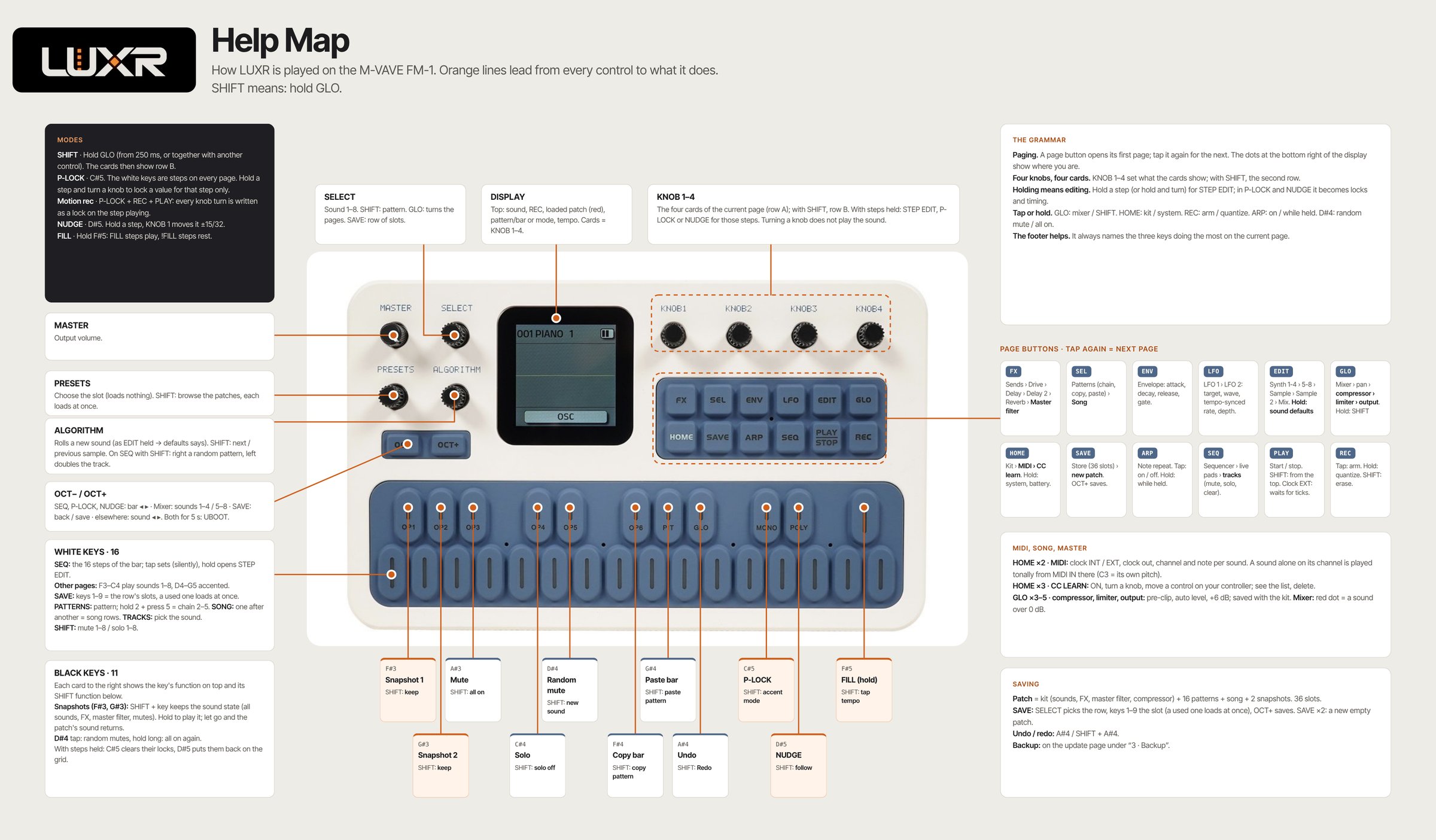
Click the map to open it full size.
4 · Backup kits and patterns
Reads every used slot (kit + 16 patterns each) over USB and saves them as a .luxr file; “Restore”
writes such a file back (backups of older LUXR versions too, they are converted). Works with LUXR from the version
this page brings.
First press “Connect” under “1 · Device” above.
5 · Back to the original firmware FM-1 V15
Choose the official FM-1.fwsc (V15) from m-vave.com/download. Only the unchanged file is accepted (SHA-256 checked). What LUXR stored in the flash stays there but is not visible in V15.
Emergency
- Update broken off: the FM-1 stays in update mode (display “UPDATE”). Plug the cable in again and press “Install” here: it continues.
- Does not start any more: two crashes within 30 s → the FM-1 enters UBOOT by itself. So does holding OCT− and OCT+ for 5 s. In UBOOT, M-VAVE's updater accepts V15.
- If none of this helps: recovery with the FM-1-transporter.
LUXR (GPL-3.0; the transient samples of the Sonic Potions LXR, © Julian Schmidt, under their non-commercial licence) builds on ONE CLICK FM-1 and Felucca by Leo Kuroshita (@kurogedelic), Hügelton Instruments; the installer code comes from Felucca. Source: Orbitator/LUXR. M-VAVE and FM-1 are trademarks of their owners. Use at your own risk, without warranty.